The best wireless headsets for work balance clear call controls, comfortable wear, and easy connections to the devices you use each day. Choose between call-focused boom microphones, open-ear designs that keep you aware of your surroundings, and headsets with noise cancellation for a quieter listening space.
Quick Top Products
JLab Epic Work ANC
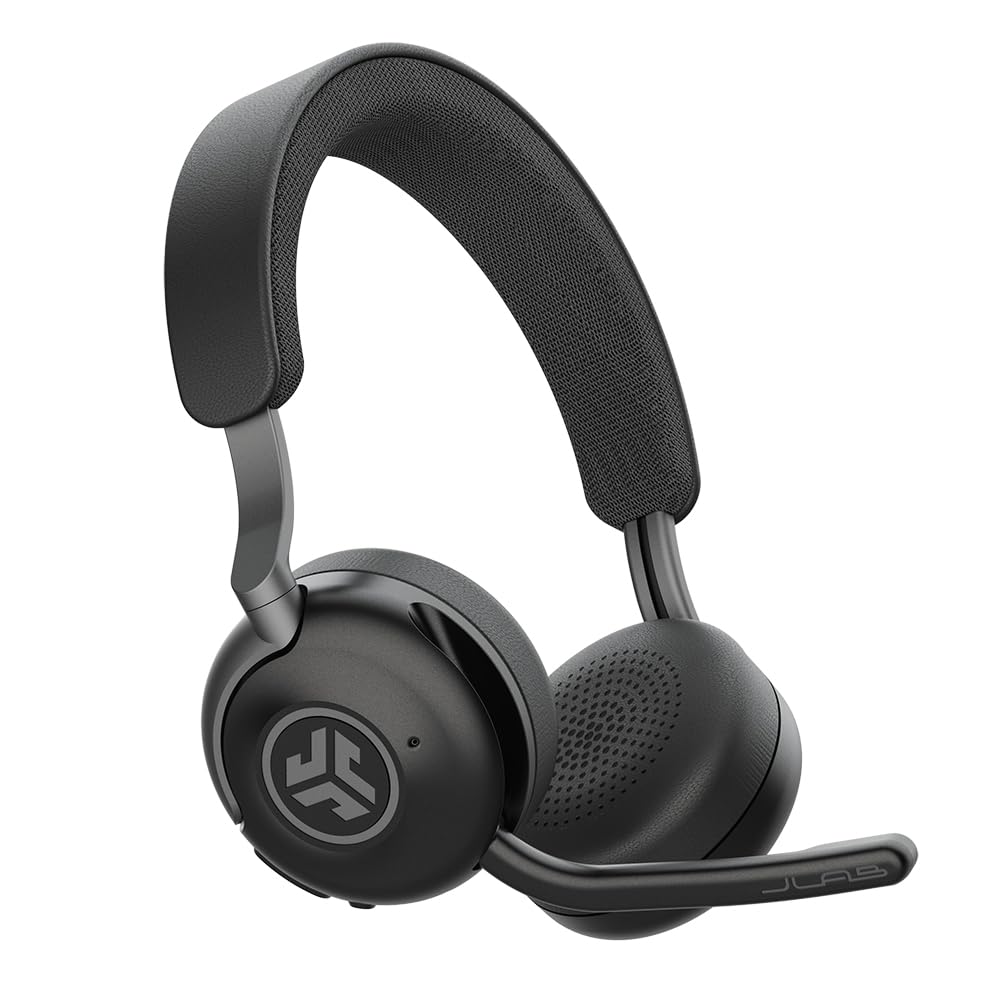
- The rotating adaptive microphone includes quick mute and Hear Yourself mode.
- Smart ANC reduces ambient noise by up to 30 dB.
- It includes a charging hub and offers 90+ hours of wireless playtime.
Best For: People who want long wireless playtime, noise reduction, and a charging hub for a work headset.

SteelSeries Arctis Nova Pro Wireless

- It connects two systems at once and can toggle between supported devices.
- Active noise cancellation and Transparency Mode offer different listening modes.
- Two hot-swappable batteries include a spare charging in the base station.
Best For: Workers who also game and want two-system connections, Bluetooth audio, and a swappable battery setup.
SHOKZ OpenMeet C610
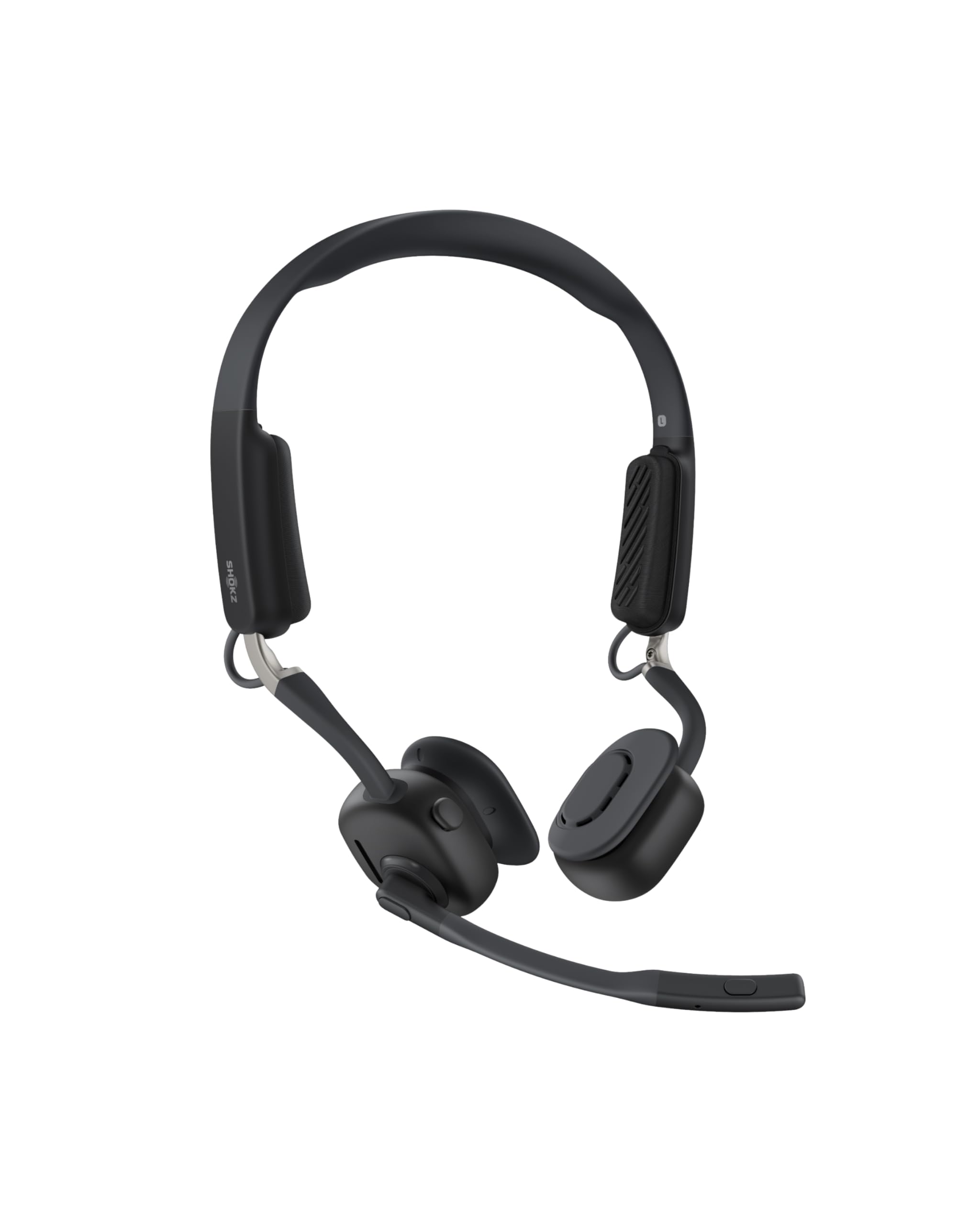
- The open-ear design weighs 78g and includes three interchangeable temple cushion sizes.
- The microphones cut 98.6% of background noise, according to the product specification.
- It supports multipoint pairing with up to two devices and has a dedicated mic button.
Best For: People who want an open-ear headset that keeps them connected to nearby conversations and calls.
JLab JBuds Work

- It offers 60+ hours of worktime per charge.
- The over-ear design includes Cloud Foam earcups and a rotating boom microphone.
- Bluetooth multipoint connects two devices, and a USB-C to 3.5mm cable is included.
Best For: Office workers who prefer an over-ear headset with a boom mic, multipoint, and long battery life.
JLab Go Work Pop

- The boom mic flips up to mute and rotates down for calls.
- Bluetooth multipoint pairs the headset with two devices simultaneously.
- It offers 50+ hours of wireless playtime and Cloud Foam earcups.
Best For: People who want an on-ear meeting headset with a flip-to-mute mic and two-device Bluetooth.
JLab Go Work

- It supports Bluetooth multipoint for two devices and includes a wired-use cable.
- The dual microphones are designed to keep calls clear by addressing environmental sounds.
- It offers 45+ hours of playtime and Cloud Foam earcups.
Best For: Workers who want an on-ear headset with both Bluetooth and a cable option for calls and media.
JLab Go Lux ANC
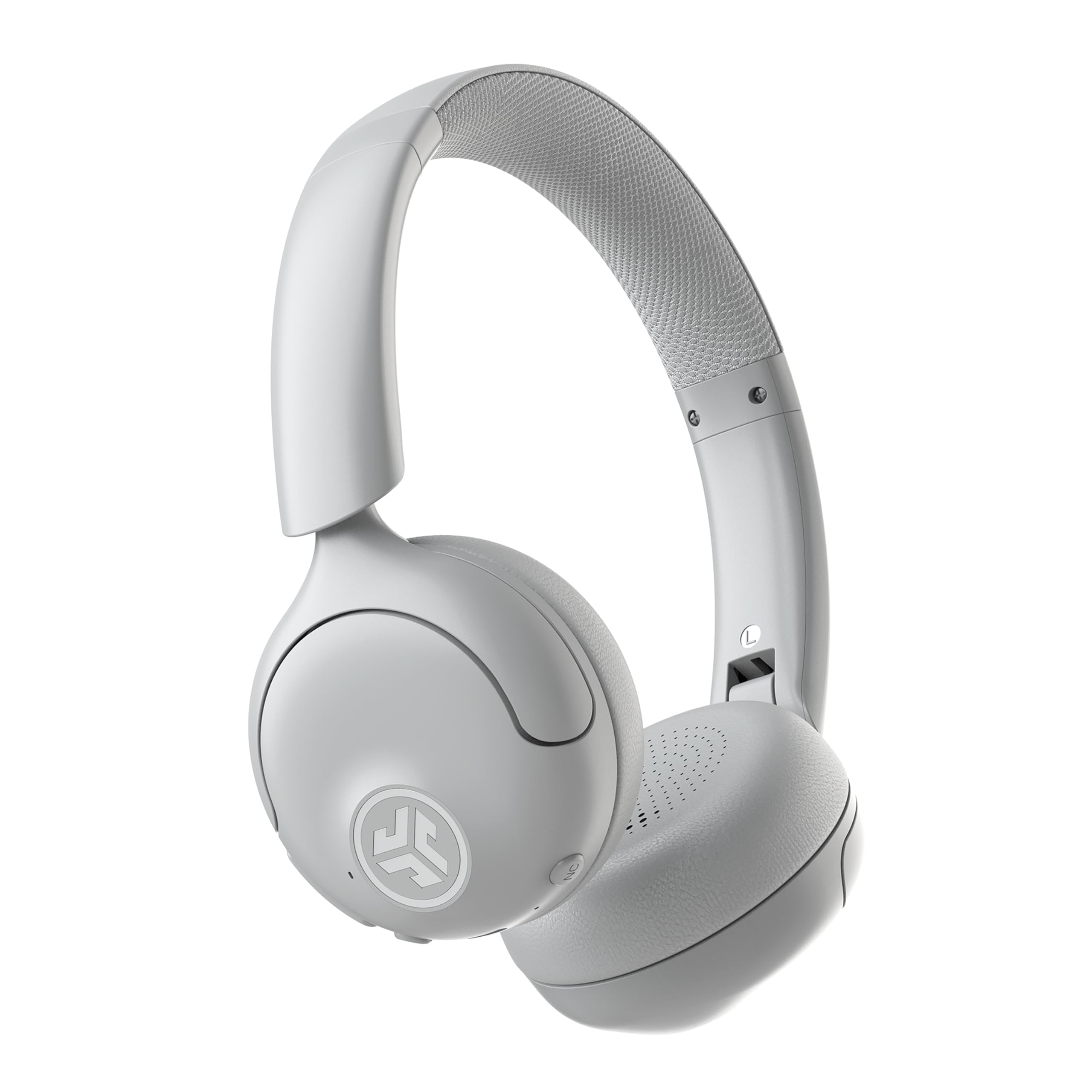
- Hybrid ANC reduces ambient noise by up to 30 dB, with a Be Aware mode available.
- Bluetooth multipoint connects two devices at once.
- The JLab App can customize EQ, ANC, and Be Aware levels.
Best For: Workers who want on-ear headphones with active noise cancellation, multipoint, and customizable controls.
SteelSeries Arctis Nova 3X Wireless
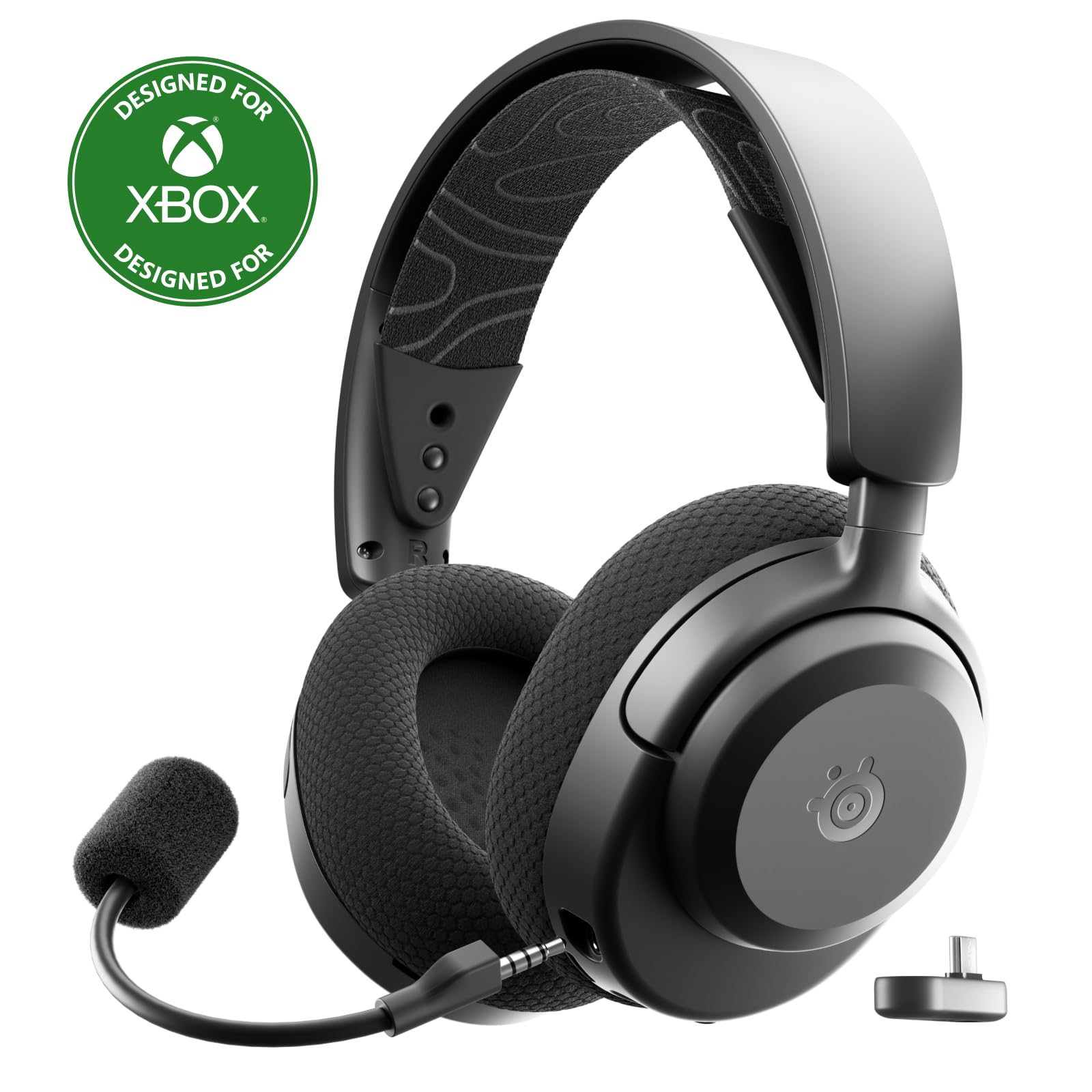
- It supports 2.4GHz and Bluetooth connections across multiple platforms.
- The headset offers up to 40 hours of battery life and fast charging.
- Its app provides 200+ game presets.
Best For: People who split time between work and gaming and want a multi-platform wireless headset with a retractable mic.
SteelSeries Arctis Nova 7P

- It supports 2.4GHz and Bluetooth, with a USB-C dongle for wireless platform use.
- The battery life is specified as 38 hours with USB-C fast charging.
- The retractable microphone can be used for calls or games.
Best For: Workers who also game and want a retractable microphone, Bluetooth mixing, and a USB-C wireless dongle.
SteelSeries Arctis Nova 5 Wireless
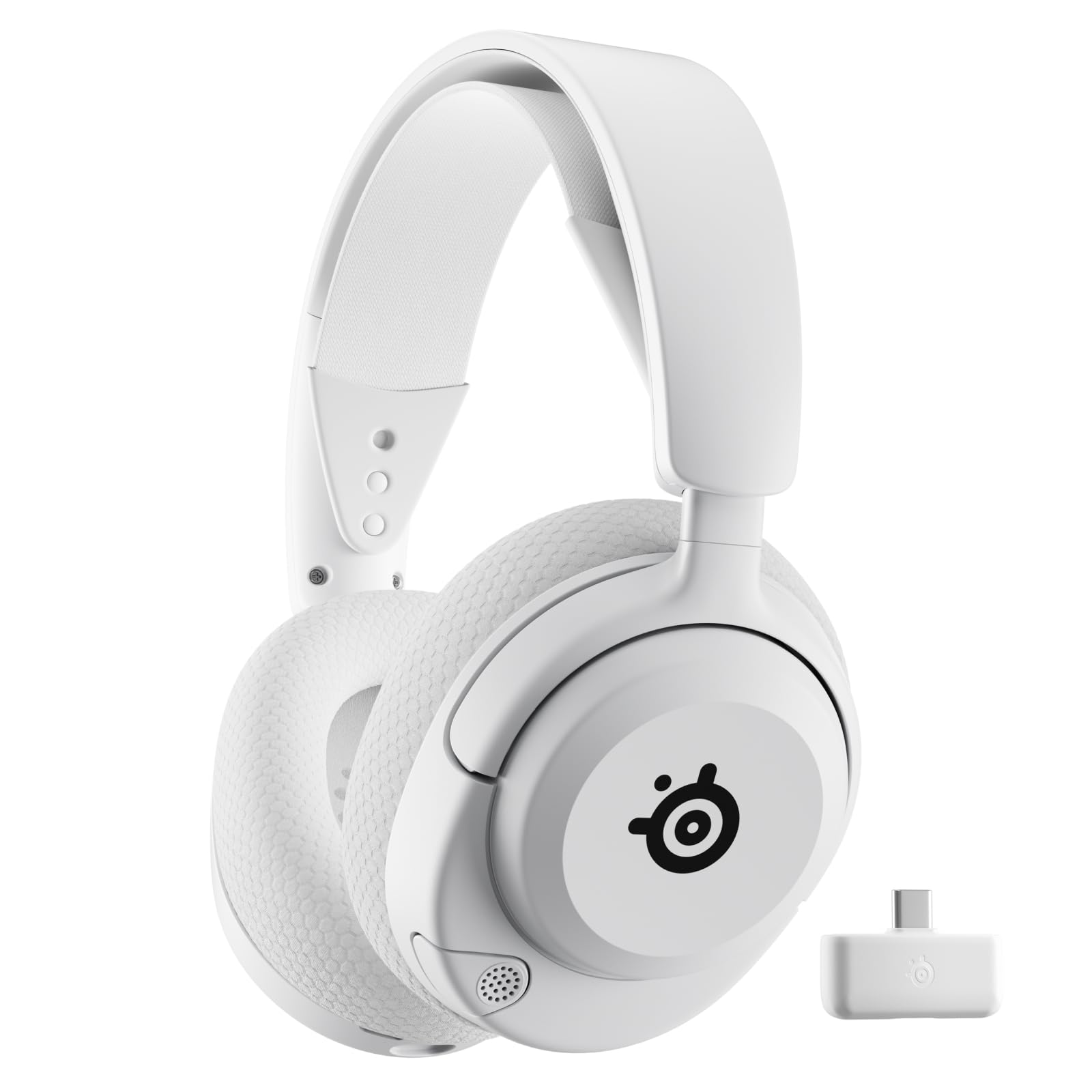
- The headset supports 2.4GHz or Bluetooth 5.3 quick switching.
- Its battery life is 60 hours, and fast charge gives six hours after 15 minutes.
- The ClearCast 2.X microphone retracts into the headset.
Best For: Workers who want a gaming headset with a retractable mic, quick Bluetooth switching, and long battery life.
Long Workdays and Noise Reduction
JLab Epic Work ANC Wireless on-Ear Headset with Microphone, smart Noise Cancellation, multipoint Connect, Charging hub, Black
The JLab Epic Work ANC combines a rotating adaptive microphone with smart active noise cancellation, making it a call-focused option for a busy desk. Its microphone has quick mute and Hear Yourself mode, while Be Aware functionality lets ambient sounds through when needed.
Multipoint Bluetooth supports connections across a PC, laptop, and mobile device, and the included charging hub helps with power management between meetings. Up to 90 hours of wireless playtime suits long stretches away from a charger.
Check whether the on-ear fit and its ANC controls match your call routine and listening preferences.
Best For: People who want long wireless playtime, noise reduction, and a charging hub for a work headset.
| Pros | Cons |
|---|---|
|
|
Choose this headset if long playtime, a charging hub, and adjustable noise awareness suit your workday. It combines ANC with Be Aware functionality, while quick mute and Hear Yourself address call control.
The description does not specify a wired mode or boom storage, so check those details if they matter for desk setup or packing.
Swap-In Batteries for Extended Sessions
SteelSeries Arctis Nova Pro Wireless Multi-System Gaming Headset — Neodymium Magnetic Drivers — Active Noise Cancellation — 2 Battery System — ClearCast Gen 2 Mic — PC, PS5, PS4, Switch, Mobile
The Arctis Nova Pro Wireless is a gaming headset with features that can carry over to a desk setup: it connects two systems at once, has active noise cancellation, and supports simultaneous Bluetooth. The base station keeps a spare battery charging, so the design can suit long sessions without waiting for a recharge.
Its ClearCast Gen 2 microphone is included for calls, while Transparency Mode lets surrounding sound in when desired. This is a feature-rich choice for someone sharing one headset across work and gaming.
Check that its gaming-focused controls and multi-system setup fit your computer and calling habits.
Best For: Workers who also game and want two-system connections, Bluetooth audio, and a swappable battery setup.
| Pros | Cons |
|---|---|
|
|
Pick the Nova Pro Wireless if your desk work shares time with gaming or multiple systems. Its base-station battery setup, ANC, Transparency Mode, and Bluetooth audio make it unusually flexible for mixed use.
The tradeoff is a gaming-oriented feature set and setup. Check how the base station fits your workspace and whether your call software and preferred devices work with the connection options.
Open-Ear Awareness at Your Desk
SHOKZ New OpenMeet - Open-Ear Bluetooth Computer Headset, Noise Cancelling Mic + Mute Button, Bluetooth 5.4 Compatible with PC & Mac, Wireless Work Headphones, Customizable Fit, Smart App - C610
The SHOKZ OpenMeet uses an open-ear design for workers who want to hear their surroundings while wearing a headset. Its dual noise-cancelling microphones are designed to reduce background noise on calls, and a dedicated mic button and LED indicator make call status easier to manage.
Multipoint pairing supports up to two devices, with a stated wireless range of up to 30m/98ft. The headset weighs 78g and has a battery life of up to 15 hours, plus a five-minute fast charge for two hours of talk time.
Check the open-ear fit and app support against your work setup.
Best For: People who want an open-ear headset that keeps them connected to nearby conversations and calls.
| Pros | Cons |
|---|---|
|
|
Choose OpenMeet if hearing nearby conversation matters more than blocking out your environment. It pairs open-ear wear with a dedicated mute button, a busy indicator, and two-device multipoint.
Its up-to-15-hour battery figure is shorter than several work-focused alternatives here, so consider your charging routine. Check the fit options and whether your desk needs a wired fallback.
Over-Ear Fit with Long Battery Life
JLab JBuds Work Wireless Headset with Microphone, Over Ear Computer Headsets, Wired or Wireless Headphones with 60+ Playtime, Multipoint Bluetooth Headset for Laptop Teams, Office with Mic (16 Pack)
The JLab JBuds Work is an over-ear wireless headset aimed squarely at calls and office use. Its boom microphone rotates out of the way for listening and has a red mute indicator; the mic can also answer or end a call when flipped.
Bluetooth multipoint connects two devices, and the included USB-C to 3.5mm cable offers a wired option. JLab specifies 60+ hours of worktime per charge, alongside Cloud Foam earcups and voice or music EQ modes.
Check whether the over-ear fit suits your comfort preference and how you plan to use the cable.
Best For: Office workers who prefer an over-ear headset with a boom mic, multipoint, and long battery life.
| Pros | Cons |
|---|---|
|
|
This is a practical fit for someone who wants an over-ear work headset with call controls and a long stated worktime. The 60+ hour battery claim, multipoint, and included analog cable cover different desk routines.
The supplied title identifies a 16-pack, though, so verify the package quantity and per-unit purchase details before ordering. Also check whether the wired mode carries microphone audio if you need calls while plugged in.
Flip-to-Mute Boom for Meetings
JLab Go Work Pop, On-Ear Wireless Headset, Bluetooth Multipoint, Noise Canceling Boom Mic, Black
The JLab Go Work Pop focuses on straightforward work calls. Its rotating boom mic activates when lowered and mutes when flipped up, and the MEMS microphone is described as noise cancelling for clearer calls.
Bluetooth multipoint connects two devices at once, which can help when moving between a computer and phone. JLab gives it 50+ hours of wireless playtime and Cloud Foam earcups in a lightweight, portable on-ear design.
Voice and Music EQ modes cover calls and listening sessions. Check whether the on-ear format works for long meetings and whether you need a wired connection.
Best For: People who want an on-ear meeting headset with a flip-to-mute mic and two-device Bluetooth.
| Pros | Cons |
|---|---|
|
|
Choose the Go Work Pop if quick physical mute control and a two-device Bluetooth connection are priorities. The mic's up/down motion is easy to understand, and the 50+ hour figure suits extended use between charges.
Its on-ear fit keeps the headset compact, but may not be your preference for prolonged wear. Check for a wired mode if you need one, since it is not specified here.
Work Headset with Wired and Wireless Modes
JLab Go Work Wireless Headsets with Microphone, 45+ Playtime PC Bluetooth Headset and Multipoint Connect to Laptop Computer and Mobile, Wired or Wireless Headphones (1 Pack)
The JLab Go Work supports wireless Bluetooth and wired use through its included USB-C to 3.5mm cable. Multipoint lets it connect with two devices at once, and its dual microphones are designed to keep calls clear by picking up the voice and reducing surrounding sounds.
The boom rotates out of the way for listening, while a red LED shows when mute is on. JLab specifies 45+ hours of playtime and Cloud Foam earcups.
The headset also has Work and Music EQ modes. Check which connection method your computer supports and whether the on-ear fit suits your day.
Best For: Workers who want an on-ear headset with both Bluetooth and a cable option for calls and media.
| Pros | Cons |
|---|---|
|
|
This Go Work model fits a desk setup that benefits from both Bluetooth and a supplied cable. Its two-device multipoint, rotating boom, and visible mute indicator are useful for switching between calls and listening.
The 45+ hour figure is shorter than the JBuds Work's stated runtime, while this package is a single headset. Check your computer's available ports and whether you need the wired connection for microphone calls.
ANC with App-Based Listening Controls
JLab, Go Lux ANC, On Ear Headphones, Active Noise Cancelling, Bluetooth MultIPoint, Cloud White
The JLab Go Lux ANC is an on-ear headphone option for workdays that mix calls, commuting, and music. Hybrid active noise cancelling reduces ambient noise by up to 30 dB, while Be Aware mode can let surrounding sound through.
Bluetooth multipoint connects two devices simultaneously, and the JLab App provides EQ, ANC and Be Aware adjustments, control remapping, and hearing-limit settings. JLab specifies up to 50 hours of playtime.
The supplied details do not identify a call microphone or call-mute control, so buyers who take frequent meetings should check those before choosing it over a boom-mic headset.
Best For: Workers who want on-ear headphones with active noise cancellation, multipoint, and customizable controls.
| Pros | Cons |
|---|---|
|
|
Consider Go Lux ANC if your workday involves listening and you value ANC, app adjustments, and two-device pairing. Its Be Aware mode adds a way to hear surrounding sounds, and the battery figure reaches up to 50 hours.
The supplied features do not identify a call microphone or mute control. Check those points before relying on it for video meetings; a dedicated boom-mic model is more explicitly call-oriented.
Gaming Presets with Fast Charging
SteelSeries Arctis Nova 3X Wireless Multi-Platform Gaming Headset — Mobile App Control — 40 HR Battery — Neodymium Magnetic Drivers — 2.4GHz/Bluetooth — Xbox, PS5, PC, Switch, Mobile — Black
The Arctis Nova 3X is another gaming-focused option that can serve a shared work and play setup. It uses a USB-C dongle for switching among Xbox, PC, PlayStation, Switch, phones, and tablets, and also supports Bluetooth.
Its microphone is identified in the title as retractable. The product specifies up to 40 hours of battery life and up to nine hours of playback after a 15-minute fast charge.
A mobile app offers 200+ game presets. Consider this model when multi-platform use matters, and check whether the listed gaming-focused audio features suit your call needs.
Best For: People who split time between work and gaming and want a multi-platform wireless headset with a retractable mic.
| Pros | Cons |
|---|---|
|
|
Pick the Nova 3X if one wireless headset needs to move among work devices and gaming platforms. The USB-C dongle, Bluetooth, retractable mic, and fast charging give it flexibility, while the 200+ presets are centered on games.
Its 40-hour figure is shorter than several work-oriented options listed here. Check your preferred call controls and whether you need a visible mute indicator before choosing it for meeting-heavy days.
Retractable Mic and Simultaneous Audio
SteelSeries Arctis Nova 7P Wireless Multi-Platform Gaming Headset — Neodymium Magnetic Drivers — 2.4GHz + Bluetooth — 38Hr USB-C Battery — Gen2 AI Mic — PlayStation, PC, Switch, VR, Mobile - Black
The Arctis Nova 7P combines 2.4GHz wireless through a USB-C dongle with Bluetooth, so it can connect to a computer or console while pairing a mobile device. Its dual audio streams allow calls or music to mix with game audio, and the retractable microphone can be hidden for listening without it.
SteelSeries specifies 38 hours of battery life and a fast-charge feature that provides six hours of play after 15 minutes. The adjustable steel headband and AirWeave memory foam cushions add fit details.
Check the gaming orientation and device compatibility for your work setup.
Best For: Workers who also game and want a retractable microphone, Bluetooth mixing, and a USB-C wireless dongle.
| Pros | Cons |
|---|---|
|
|
Choose the Nova 7P if you want a retractable mic and simultaneous Bluetooth audio in a headset shared between work and gaming. Its 38-hour battery specification and quick-charge figure support regular use, and the fit details are more explicit than many records.
The gaming positioning means you should confirm the dongle and call setup fit your computer. Check whether a dedicated mute control is important, since one is not specified.
Long Battery Life and Retractable Mic
SteelSeries Arctis Nova 5 Wireless Multi-System Gaming Headset — White — Neodymium Magnetic Drivers — 100+ Audio Presets — 60 HR Battery — 2.4GHz or BT — Gen2.X Mic — PC, PS5, PS4, Switch, Mobile
The Arctis Nova 5 is a gaming headset with useful flexibility for work calls and media. Its retractable ClearCast 2.X microphone supports calls, and a button switches between 2.4GHz and Bluetooth 5.3.
The headset can connect with a compact USB-C dongle across supported computers and mobile devices, while the listed battery life is 60 hours with USB-C fast charging. A companion app offers 100+ game audio presets.
Check your computer's connection and whether the gaming presets and controls add value to your work routine.
Best For: Workers who want a gaming headset with a retractable mic, quick Bluetooth switching, and long battery life.
| Pros | Cons |
|---|---|
|
|
This Nova 5 suits someone who wants one headset for gaming and work calls, especially if switching between Bluetooth and a USB-C dongle is useful. Its 60-hour specification is among the longer figures here, and the mic retracts fully.
The feature set includes game presets, so consider whether those matter in your routine. Check that your work computer supports the connection method you plan to use and that you are comfortable with its retractable mic controls.
How to Choose Wireless Headsets For Work
How We Picked Wireless Headsets for Work
We prioritized products with clear work-call features: a microphone suited to calls, an easy mute method, or explicit support for two-device switching. The strongest call-focused options include the JLab JBuds Work, Go Work, Go Work Pop, and Epic Work ANC.
Each has a boom microphone and controls suited to meeting use, though their form factors and included connection options differ.
We also included a smaller set of multipurpose models where the records establish a plausible desk use alongside gaming or general listening. These add options for open-ear awareness, active noise cancellation, retractable microphones, or multi-platform connections.
The Go Lux ANC is a more conditional choice because its supplied details do not identify a microphone for calls.
Comparing Wireless Headsets for Work
The most useful distinctions are call controls, fit, and connection flexibility. The Go Work and JBuds Work have rotating boom microphones, with the JBuds version adding flip-to-answer and hang-up behavior.
The Go Work Pop makes mute a simple boom movement. Epic Work ANC adds ANC, Be Aware mode, multipoint, and a charging hub.
OpenMeet takes a different approach: its open-ear fit keeps the wearer connected to nearby sounds, with a dedicated mic button and busy indicator.
For device switching, several JLab work models support Bluetooth multipoint, and Go Work also includes a 3.5mm cable. SteelSeries Nova headsets add a 2.4GHz dongle alongside Bluetooth, which can suit a combined computer, console, and phone setup.
Battery figures vary across products, but compare them as stated capacities rather than promises of identical runtime: the Epic Work ANC specifies 90+ hours, while OpenMeet specifies up to 15 hours.
| Product | Standout features | Best for |
|---|---|---|
| JLab Epic Work ANCCheck Price |
| People who want long wireless playtime, noise reduction, and a charging hub for a work headset. |
| SteelSeries Arctis Nova Pro WirelessCheck Price |
| Workers who also game and want two-system connections, Bluetooth audio, and a swappable battery setup. |
| SHOKZ OpenMeet C610Check Price |
| People who want an open-ear headset that keeps them connected to nearby conversations and calls. |
| JLab JBuds WorkCheck Price |
| Office workers who prefer an over-ear headset with a boom mic, multipoint, and long battery life. |
| JLab Go Work PopCheck Price |
| People who want an on-ear meeting headset with a flip-to-mute mic and two-device Bluetooth. |
| JLab Go WorkCheck Price |
| Workers who want an on-ear headset with both Bluetooth and a cable option for calls and media. |
| JLab Go Lux ANCCheck Price |
| Workers who want on-ear headphones with active noise cancellation, multipoint, and customizable controls. |
| SteelSeries Arctis Nova 3X WirelessCheck Price |
| People who split time between work and gaming and want a multi-platform wireless headset with a retractable mic. |
| SteelSeries Arctis Nova 7PCheck Price |
| Workers who also game and want a retractable microphone, Bluetooth mixing, and a USB-C wireless dongle. |
| SteelSeries Arctis Nova 5 WirelessCheck Price |
| Workers who want a gaming headset with a retractable mic, quick Bluetooth switching, and long battery life. |
Choosing a Headset for Calls, Focus, and Awareness
For frequent video meetings, look for a boom microphone, visible or physical mute control, and a fit you can wear through the workday. The JLab models make their microphone controls explicit.
A red mute indicator appears on Go Work and JBuds Work, while the Go Work Pop uses flip-to-mute. If you move between a laptop and phone, two-device multipoint can reduce the need to disconnect and pair again.
Noise control depends on whether you want to quiet incoming sound or stay aware of the room. Epic Work ANC and Go Lux ANC specify active noise cancellation, and both include a mode that lets ambient sound through.
OpenMeet is open-ear, so it takes a different route to awareness. Check microphone behavior separately from headphone ANC: a feature that reduces background listening noise does not by itself establish how your outgoing voice sounds.
Picking a Comfortable Fit for Your Workday
On-ear models sit on the ears, while the JBuds Work is explicitly over-ear and OpenMeet leaves the ears open. The right fit depends on whether you prefer a compact headset, fuller ear coverage, or ambient awareness.
Where the records identify cushioning, JLab work models use Cloud Foam earcups; SteelSeries Nova 7P lists AirWeave memory foam cushions and an adjustable steel headband. These features describe the design, but comfort remains personal, so check fit and return terms before committing to long daily use.
A charging routine can matter as much as the headline battery figure. Go Work Pop, Go Work, JBuds Work, and the SteelSeries Nova models all describe fast or lengthy playback options, while OpenMeet specifies a shorter maximum and short fast-charge boost.
If a headset stays at a shared desk, a charging hub or convenient USB-C access may be more useful than maximizing battery life.
Who Should Buy Which Wireless Work Headset?
Choose a JLab work model when call controls and multipoint are central: Go Work Pop has flip-to-mute, Go Work adds a wired option, and JBuds Work has an over-ear fit with call-answer behavior. Pick Epic Work ANC if ANC, a charging hub, and long stated playtime matter.
Choose OpenMeet if open-ear awareness is the priority.
For a combined work-and-gaming setup, consider a SteelSeries Nova model based on its dongle, Bluetooth, retractable mic, and supported devices. Go Lux ANC is better suited to listening-focused work unless its microphone and mute details meet your calling needs.
Compare the fit, mute method, and connection path against the way you actually move through meetings, phone calls, and focused work.